


AnyPlant: AI Plant Identifier
3.70.00 Reviews
App Specs
- Version
- 1.20.5
- Updated On
- License
- Free
- Downloads
- 100,000+
- Developer
- Rydea GO.
- Categories
- House & Home
- Platform
- Android
Screenshots
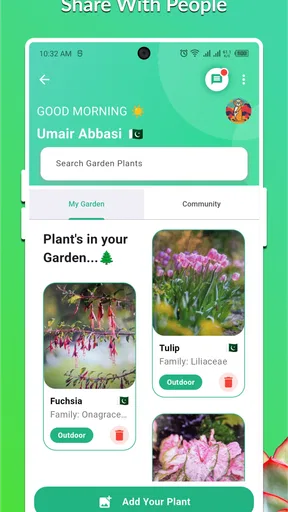
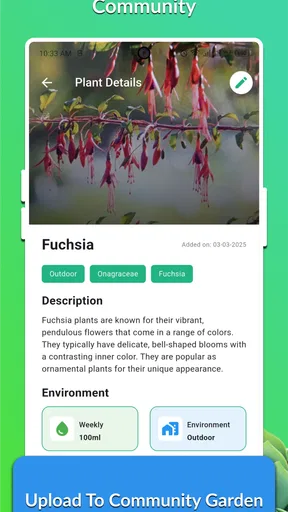
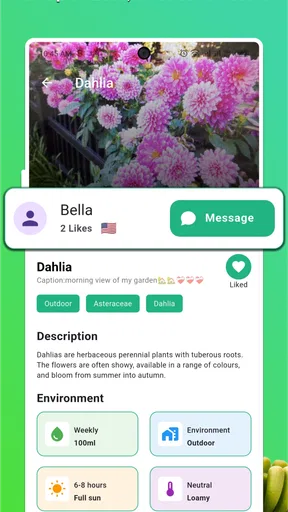
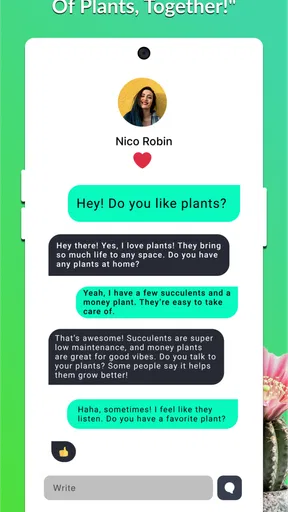
 Analysis by AppCompare
I usually turn to a plant identifier at the exact moment I am standing beside something I cannot name. AnyPlant: AI Plant Identifier is built for that small but useful situation, while also adding a community layer for people who want to discuss plants with others. I found it most appealing as a quick first step: take a photo, get an identification, then use the result to guide further care or conversation rather than treating the answer as unquestionable botanical proof.
That distinction matters. The app is free to install, aimed at Everyone, and belongs naturally in the House & Home category, but its usefulness depends on how carefully I use it. A clear image of leaves can produce a practical starting point; a blurry photo, a damaged plant, or a species with several similar relatives deserves more caution. My overall impression is that it is friendlier than searching through long plant lists, especially for beginners, but experienced growers will still want to verify important identifications elsewhere.
How I use AnyPlant from the first photo to a useful answer
I treat the first result as a lead, not a verdict: I check whether the suggested plant fits the visible shape, then decide what evidence would make the identification more convincing. In this section, I’ll walk through how I turn a quick photo into a useful next step, including when a second angle or a community question is worth the extra effort.
The baseline workflow is pleasantly simple
My normal routine begins with one plant and one question. I open the app, photograph the subject, and look at the identification as a suggestion that needs context. I try to include the whole plant when its shape is distinctive, then take another image closer to the leaves if the first view is too general. This two-photo habit is more useful than repeatedly photographing the same angle because plant structure often separates similar-looking varieties better than a single leaf does.
For a houseplant, I would photograph it in ordinary daylight rather than under a strong colored lamp. I also avoid placing several plants in the same frame. A clean background and a visible leaf surface give the AI a better chance of focusing on the plant I actually want to identify. These are simple habits, but they make the result more dependable without requiring specialist knowledge.
The app works best when I treat the identification as the beginning of a workflow. Once I have a likely name, I can search for care guidance, compare the result with the plant’s growth pattern, or ask other plant enthusiasts for an opinion through the community side. That combination is more useful than an isolated label because the label alone does not tell me whether my plant is stressed, recently repotted, or receiving too much sun.
A realistic example is a plant bought without a label at a local market. At home, I would take a full image, then a close image of the leaves and stem. If AnyPlant suggests a likely match, I would compare the visible features with reliable care references before watering or moving it. If the plant looked unusual, I would share the photos with the community and explain where it came from and how it is currently growing. That extra context can prevent a rushed care decision based on a weak guess.
Worth Reading Before You Choose

EA SPORTS FC Mobile 26 Is a Bigger Football Game, but It Takes Time

Flipboard Shows What News Apps Must Do Beyond the Feed

Switching to Android Auto Means Rethinking Your Driving Routine

Google Calendar Makes a Crowded Week Easier to Manage

Ludo King Makes the Most of the Minutes Between Plans

Baby Panda World Brings Quick Play to Modern Phones, but Its Game Library Feels Busy
What the community adds beyond an automatic label
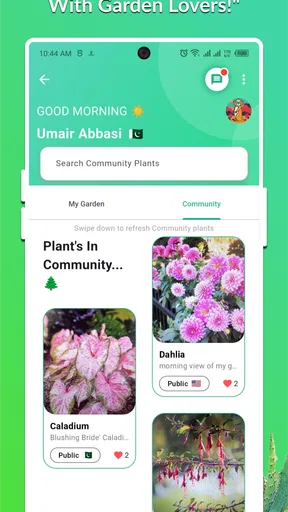
The community feature changes the app from a one-tap recognition tool into a place for discussion. I see the greatest value here when the question is not simply “What is this?” but “Why does this plant look different from the pictures?” A group of people can notice details an automated result overlooks, such as a mature leaf shape, a damaged edge, or a growth habit that appears only after the plant has settled indoors.
I would use that space to ask focused questions rather than posting a bare image. Mentioning whether the plant is indoors, whether the leaves are new or old, and whether the discoloration appeared suddenly gives other users something practical to work with. It also makes the conversation more reusable for me later, because I can remember what changed and which suggestions were actually helpful.
There is a trade-off, though. Community advice is not automatically expert advice. Different people may recommend different watering routines, and a confident answer can still be wrong. I prefer to use the discussion as a way to generate possibilities, then check the most important points against a trusted horticultural source. This is particularly important if the plant may be toxic to pets, if I am dealing with a serious pest problem, or if the identification affects a valuable collection.
Settings and habits worth checking before regular use
Rather than rushing straight into repeated scans, I would spend a moment checking how the app fits my routine. The most important practical setting is the way I handle photographs. I keep the subject well lit, avoid glare on glossy leaves, and make sure the camera is focused before taking the image. If I am outside, I try not to photograph directly into harsh sunlight, since strong contrast can hide color and texture.
I also pay attention to the distinction between identifying a plant and diagnosing a problem. A plant can be correctly named while its yellowing leaves still have several possible causes. AnyPlant is valuable for narrowing down the identity, but I would not interpret a name as a complete care plan or a medical-style diagnosis for the plant. This is one of the most important settings in my own mindset: I decide what question I am asking before I take the picture.
When I use the community, I prepare the information I would want from somebody else. I include more than one angle when possible, describe the light, and mention recent changes such as moving the pot or changing the watering pattern. This makes the social feature more efficient and reduces the chance of receiving vague advice based on one misleading photograph.
It is also worth remembering that the app is free but includes in-app purchases ranging from $10.99 to $39.99 per item. I would begin with the free experience and only consider a purchase after deciding that the identification and community workflow genuinely fits my needs. That approach is especially sensible for someone who identifies plants only occasionally. A frequent collector may see more value in extra access, but the price range makes it important to understand what I personally use before spending money.
Faster patterns for people who identify plants often
Experienced use is less about taking more photos and more about making each photo answer a different question. My quickest pattern is a three-part check: first, capture the overall silhouette; second, capture the most characteristic leaf or flower; third, write down the location and growing conditions. I do not always need all three images, but thinking in those terms helps me avoid relying on a single weak close-up.
For a group of unknown plants, I would work from left to right and identify each one separately instead of photographing the entire shelf. I would save the likely names in my own notes alongside the date and location, because the app is not a substitute for a personal plant inventory. This is a small but valuable distinction: identification is a moment, while collection management is an ongoing task.
Another efficient habit is to photograph a plant when it looks healthy, not only when something goes wrong. A clear reference image gives me something to compare with later if the leaves curl, fade, or develop spots. In that sense, AnyPlant can become part of a simple observation routine. The app identifies the subject, while my own dated images provide the evidence of change.
I would also avoid scanning every new leaf after the first successful identification. Once I have a convincing result, repeated scans of the same plant may add little value unless its appearance has changed substantially. The better use of time is to verify uncertain cases, document growth, or ask a more specific community question. This keeps the app from becoming a novelty and turns it into a practical reference step.
For outdoor walks, I would use the same method but add caution around lookalikes. A plant that appears familiar may have a similar relative with very different properties. I would not eat, handle, or use an unknown plant medicinally because an AI suggestion seems plausible. The app can help me decide what to research next; it should not replace responsible identification practices.
Where the AI approach reaches its limits
The central weakness is the same strength that makes AnyPlant convenient: it produces a fast answer from an image, and fast answers can encourage overconfidence. Plant identification becomes difficult when the photograph lacks flowers, when the plant is young, or when the leaves have been altered by pests, pruning, drought, or indoor conditions. In those cases, I want the app to be a starting point rather than the final authority.
Similar species are another challenge. A general label may be enough for basic care, but not for a collector choosing a precise cultivar or trying to confirm a rare specimen. If the result affects a purchase, a pet-safety decision, or a treatment plan, I would compare the image with specialist references and seek a knowledgeable human opinion. The community can help with that second look, but I still evaluate the quality of each response.
The app is also not the right choice for someone who wants a complete garden management system. If my priority were detailed watering schedules, inventory records, weather-linked reminders, or a structured long-term care database, I would look for a dedicated plant-management tool instead. AnyPlant’s appeal is the combination of recognition and conversation, not an all-purpose replacement for every gardening utility.
Likewise, a person who already knows how to identify common plants may find the automatic scan less valuable. For that user, the community may be the stronger reason to stay, particularly when discussing unusual growth or comparing experiences. Someone who dislikes social features, prefers printed field guides, or wants a strictly offline reference may be happier with a traditional identification guide and personal notes.
The app’s average rating is 3.7 from over 500 ratings, and it has passed the 100K+ install mark. I read that as a sign of useful but not universally perfect software: enough people are using it to make the concept practical, while the middling average suggests that results and expectations can vary. I would set realistic expectations rather than assuming every image will receive a precise answer.
How AnyPlant compares with the usual alternatives
Compared with a web search, AnyPlant removes much of the initial work. I do not need to guess a descriptive phrase for an unfamiliar leaf before finding relevant results. The camera-first approach is faster when I have no vocabulary for what I am seeing. The weakness is that a search lets me inspect many sources immediately, while an AI result can anchor me on one possibility too early.
Compared with a printed field guide, the app is more convenient for casual identification and more interactive because of its community. A book remains excellent for learning visual distinctions and browsing related species without depending on a photograph. I would choose the guide when I want to study a region or family in depth, and AnyPlant when I want a quick lead while standing beside a plant.
Compared with a dedicated care tracker, AnyPlant feels more discovery-oriented. It helps me move from an unknown plant toward a name and a conversation. A tracker would be better once I have a settled collection and need consistent records. In practice, I can imagine using both kinds of tool: AnyPlant at the identification stage, then a separate system for routines that require long-term organization.
Who should use it, and who should skip it
I would recommend AnyPlant to beginners who regularly encounter unlabeled houseplants, shoppers who want to research a plant before buying it, and hobbyists who enjoy asking other growers for opinions. It is also useful for someone building confidence: the camera provides an accessible entry point, while the community gives a place to test observations and learn the language of plant care.
I would be more cautious recommending it as the only tool for professionals, serious collectors, or anyone making safety-sensitive decisions. Those users need precise confirmation and may prefer specialist references, botanical societies, or direct expert help. The app can still be part of their workflow, but I would not let a quick identification determine treatment, pet access, consumption, or a costly purchase.
Because it is free to start and rated for Everyone, it is easy to try without making the experience feel like a major commitment. The current version is 1.20.5, and it runs on Android 7.0 or later, which makes it accessible on many older devices. I would still judge it by the quality of my own results rather than by compatibility alone, since camera quality, lighting, and the plant itself influence the experience heavily.
My verdict after building a repeatable routine
AnyPlant: AI Plant Identifier works best when I use it as a practical identification assistant, not as an infallible botanist. Its strongest combination is the quick photo workflow followed by a chance to discuss the result with a wider plant community. That makes it more useful than a bare scanner when I am curious, unsure, or trying to understand why a familiar plant looks different.
The key to getting more from it is repeatability: take clean images, separate overall shape from close detail, record the growing context, and verify important conclusions. Those habits improve the quality of the interaction without pretending that the app can solve every identification problem. I also appreciate that the free starting point lets occasional users test the workflow before considering the available purchases.
My final recommendation is straightforward. If you want a friendly way to turn an unknown plant into a researchable name and a conversation, I think it is worth trying. If you need a definitive botanical reference, a complete care scheduler, or guaranteed answers for safety-related decisions, choose a more specialized source and use AnyPlant only as one part of the process. For everyday plant curiosity, however, it offers a sensible first step and becomes noticeably better when paired with careful photos and disciplined follow-up.
Pros
- Identifies many common houseplants from a single photo.
- Provides basic care guidance for watering
- light
- and soil.
- Useful for beginners learning plant names and requirements.
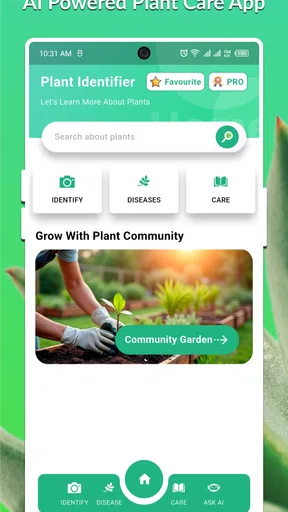
- Clean interface makes scanning plants quick and straightforward.
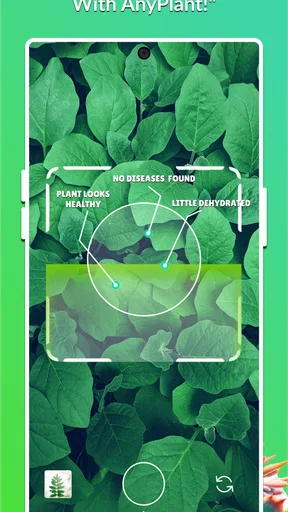
- Can help spot possible health issues through leaf photos.
Cons
- Results may be inaccurate with blurry photos or unusual plant varieties.
- Some advanced identification or care features may require payment.
- Care advice can be too general for specific cultivars or local climates.
- The app may need internet access for image analysis and results.
- Plant health suggestions should not replace advice from a horticulture expert.
FAQs for AnyPlant: AI Plant Identifier
What is AnyPlant: AI Plant Identifier used for?
AnyPlant: AI Plant Identifier is designed to help you recognize plants by analyzing a photo taken with your phone or selected from your gallery. After processing the image, it may suggest the plant’s common and scientific name, along with basic information about its characteristics and care. It is useful for curious gardeners, hikers, students, and anyone who wants a quick identification without consulting a field guide.
How accurate is AnyPlant when identifying plants?
The app can provide helpful results, but its identification should not be treated as guaranteed. Accuracy depends on image quality, lighting, the visible parts of the plant, and how similar the species are to one another. Clear photos of leaves, flowers, stems, or fruit usually produce better suggestions. Before using the result for gardening, treatment, or consumption, verify it with a trusted botanical or professional source.
Does AnyPlant offer plant care advice after identification?
AnyPlant may provide care-related information alongside an identification result, such as general guidance about watering, light, soil, or growing conditions. However, these recommendations should be considered a starting point rather than a personalized diagnosis. Plant needs can vary according to climate, season, pot size, soil, and health. If a plant is wilting, diseased, or exposed to pests, additional research may still be necessary.
Is AnyPlant: AI Plant Identifier free to download and use?
The application may be available to download at no initial cost, but some features can be restricted by advertisements, usage limits, subscriptions, or in-app purchases. The exact offer can change depending on the platform, region, and current version. Before starting a trial or confirming a purchase, review the pricing page and subscription terms carefully, especially the renewal conditions and cancellation method associated with your Apple or Google account.
What should I know about privacy when using AnyPlant?
Because the app needs an image to identify a plant, users should review its privacy policy and the permissions requested during setup. Check whether photos are processed on the device or uploaded to an online service, and whether images or diagnostic data may be stored. You can limit access to your camera and photo library through your device settings, while avoiding pictures that contain faces, documents, locations, or other sensitive information.


